
LeadForge
Lead research and outreach tool · built and used by me
LeadForge is a lead research tool I built and use for my own outreach. It pulls local service businesses from the Google Places API across 50 business categories, stores them in Postgres, then runs each record through an LLM (DeepSeek V4 Flash via OpenRouter) to add owner names, technology signals and an outreach angle. Built on Next.js.
The problem
What problem does LeadForge solve?
Cold outreach to small local businesses fails at the research step. Public directories give you a name, a phone number and a website. They do not tell you who owns the business, what its website runs on, or why it would care about what you sell. Buying that data for 50 categories is expensive, and doing it by hand does not scale for a one-person marketing function.
LeadForge is the tool I built to do that research for my own outreach: collect businesses by category, qualify them, enrich each record, and generate an outreach angle, in one place.
How it works
How does LeadForge work?
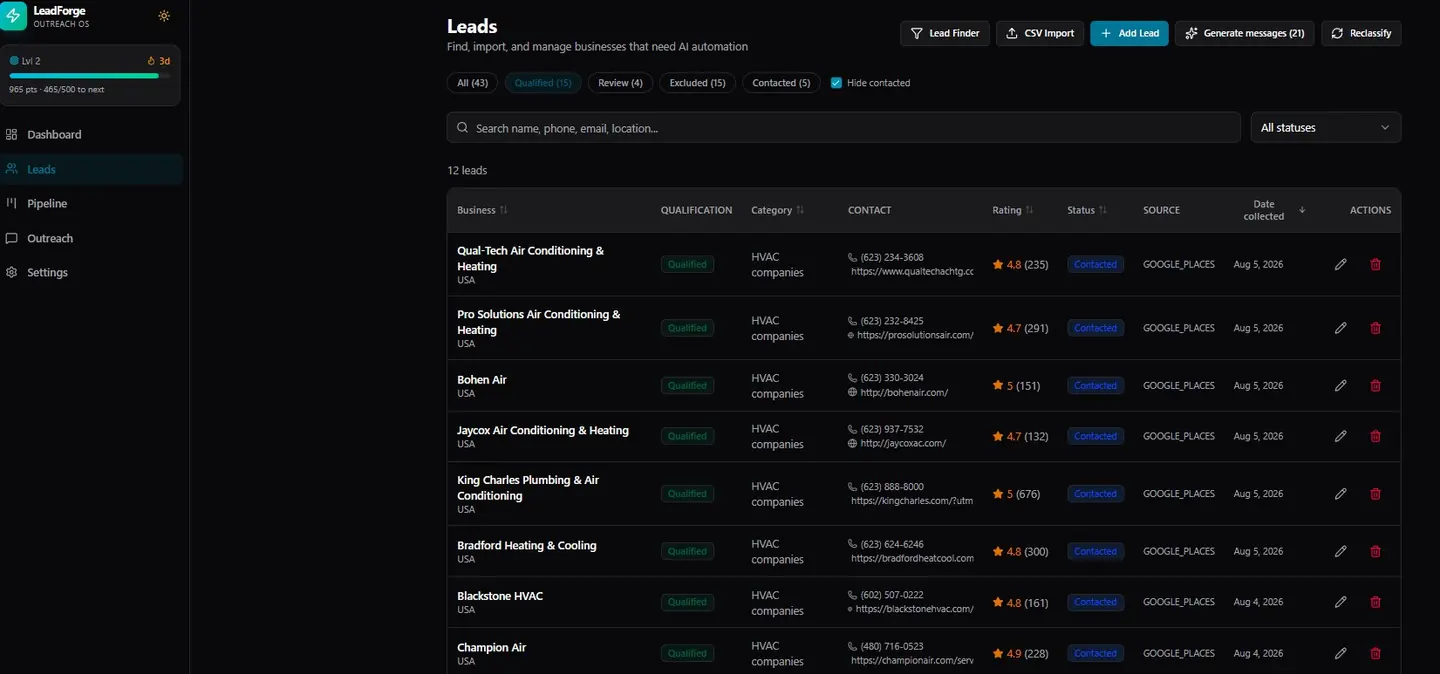
- Collect. Lead Finder queries the Google Places API by business type, for example HVAC contractors, and stores each business with its phone, website, rating and review count in Postgres. Categories are Google Places business types for local service businesses; 50 are configured.
- Qualify. Each lead gets a status: qualified, review, excluded or contacted. Contacted leads are hidden from the working list so the same business is not approached twice.
- Enrich. Records go through an LLM via OpenRouter, default model DeepSeek V4 Flash, chosen for cost and structured output. The model returns owner names, technology signals from the business website and an outreach angle for each lead.
- Audit and brief. For leads worth a deeper look, a sitemap defect scanner and a growth audit runner check the business website, and a rebuild brief generator turns the findings into a written brief.
- Reach out. Generate messages drafts outreach from the enriched record and the audit findings. Leads and their data are available through an export API and CSV.
The stack
What is LeadForge built with?
- Framework
- Next.js
- Database
- Postgres
- Business data
- Google Places API
- LLM access
- OpenRouter
- Default model
- DeepSeek V4 Flash
- Interfaces
- Web dashboard, CSV import, export API
Why it matters
Why build it instead of buying a lead database?
I hold a computer science degree, which is why I build my own tools instead of paying for software I do not need. LeadForge is the clearest example: it is the research layer for my own outreach, and the same pattern of scrape, enrich with an LLM and generate an angle is what I set up as AI-powered marketing operations for clients.
FAQ
Frequently asked questions
What is LeadForge?
LeadForge is a lead research and outreach tool I built and use myself. It collects local service businesses from the Google Places API across 50 categories, qualifies them, and enriches each record with owner names, technology signals and outreach angles using an LLM.
What is LeadForge built with?
Next.js for the application, Postgres for storage, the Google Places API for business data, and OpenRouter for LLM access with DeepSeek V4 Flash as the default model.
Which LLM does LeadForge use for enrichment?
Enrichment runs through OpenRouter. The default model is DeepSeek V4 Flash, chosen for cost and reliable structured output.
Is LeadForge available to use?
LeadForge is a tool I built for my own outreach work. If you want the same kind of AI-powered lead research or marketing operations set up for your business, get in touch.
Currently available for new SEO and AI-powered email marketing operations engagements. Last updated September 2026. Get in touch.